
xVAS • EXTENDED VISUAL AUGMENTATION SYSTEM
xVAS turns any enabled electro-optical device into a fully customizable, connected display terminal. Tailor reticles, overlays, and layouts to the mission, and bring sensor and operational data into a single heads-up or weapon-mounted display.
Augmented Vision.
See BEYOND.
One display
Sensors, device and C2 data
Connected
Desktop, mobile TAK
Configure once
Deploy everywhere

xVAS PC SIMULATOR
HOW IT WORKS
THREE LAYERS.
ONE CONNECTED SYSTEM.
xVAS is the software backbone that links your devices, your data, and your team. It runs on the device, moves data in real time, and connects to the platform your operators already use.

01
Embedded library
Runs directly on enabled devices, handling display, reticles, overlay, and interface layouts on low-power hardware.
02
Communication protocol
A real-time protocol for seamless data exchange between devices, sensors, and end-user devices.
03
Back-end API
Connects everything to desktop, mobile, and TAK platforms, so operational data reaches the whole network.
UNIFIED ECOSYSTEM
MORE SITUATIONAL AWARENESS.
LESS COMPLEXITY

Every enabled device becomes a central hub for viewing, sharing and acting on operational data across your connected network
01
External sensor data
Imagery and reading from sensors, place in the operator's view.
02
Connected devices
End-user devices, smart battery pack, and companion hardware on one link.
03
Operational information
TAK and Cursor on Target data, navigation, and team updates in real time.
CONFIGURE ONCE.
DEPLOY EVERYWHERE.
WIN xVAS • DESKTOP COMPANION APP
WIN xVAS gives your team a desktop interface for device configuration, content management, and full customization.


NAVIGATION WIDGETS
GUI BUILDER • LAYOUTS & WIDGETS
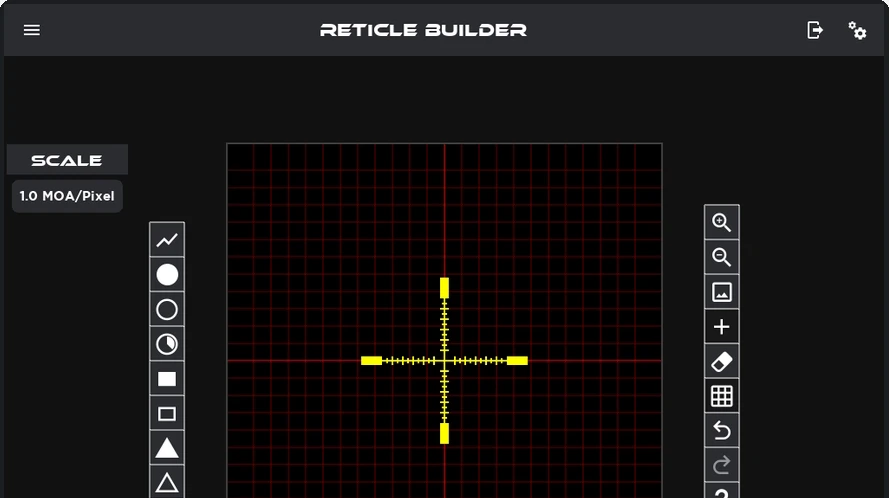
RETICLE BUILDER • CUSTOM RETICLE
Device configuration
Select and configure each enabled device from one desktop application.
Layouts & widgets
Arrange timers, range, speed, navigation and sensor widgets page by page, then save and load layouts in your xVAS-enabled device.
Reticle design
Draw custom reticles on a scaled MOA grid to match the weapon, optic, or user preference.
MAKE YOUR DEVICE xVAS-ENABLED

License the embedded library
Add xVAS display, reticle, and overlay capability to your device firmware under a license agreement.
FOR OEMs & PROGRAMS

Integrate with our engineers
Our team supports sensor-to-display integration, power budgets, and HMI so the integration fits your platform.
Build xVAS into your hardware to give your product customizable displays and TAK connectivity without building the stack from scratch.

Join the connected network
Your device works alongside other xVAS-enabled hardware, xVAS apps and TAK from day one.